Stop Boring Your Audience: How to Master PowerPoint and Public Speaking
Stop Boring Your Audience: How to Master PowerPoint and Public Speaking
Ask MyTutorLesson: How Can I Keep People Focused on My PowerPoint Presentations?
Have you ever looked out at your audience during PowerPoint presentations only to see a room full of people staring at their phones, yawning, or glazed over? It is a frustrating feeling. You have valuable information to share, but somewhere between clicking “Next Slide” and speaking, you lose their attention.
The truth is, a great PowerPoint isn’t just about the software—it is about how your slides work in harmony with your speaking voice.
In today’s Ask MyTutorLesson mailbag, we are tackling a question that every professional, educator, and student has faced at least once.
QUESTION:
“I find that when I give a PowerPoint, people tend to not pay attention to what I am saying. How can I develop my speaking voice skills to present a stronger, more informative presentation that will educate and entertain all of my audience?”
ANSWER:
Improving your PowerPoint presentations and commanding the room comes down to three main pillars: designing clean visuals, structuring a compelling script, and mastering your vocal delivery.
When your slides act as a visual anchor rather than a distraction, your voice naturally becomes the main event.
The Ultimate Presentation Blueprint: 10 Tactics to Command the Room
Follow these actionable tactics to instantly elevate your next speaking engagement and keep your audience hooked from start to finish:
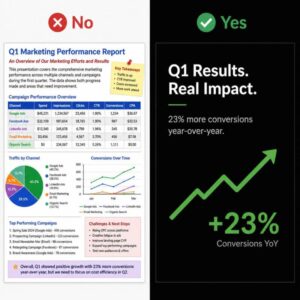
Optimize Your Slides for Speaking
GPT Image created via Leonard.AI
The “5×5” Rule: Limit your slides to a maximum of 5 bullet points, and no more than 5 words per bullet. Slides are meant to be visual aids, not teleprompters.
Remove the Clutter: Never paste entire paragraphs onto a screen. If your audience is busy reading a wall of text, they have completely stopped listening to your voice.
Reveal Bullet Points One by One: Use simple entrance animations to show only the specific point you are currently discussing. This keeps eyes glued to the screen and ears tuned to your spoken words instead of letting people read ahead.
Use High Contrast: Ensure your text is large enough to be read clearly from the very back of the room and stands out boldly against the background.
Work from Outlines, Not Scripts: Writing and memorizing a word-for-word script is a recipe for panic if you accidentally skip a syllable. Instead, outline your key takeaways and elaborate naturally from your core knowledge.
Hook the Audience Early: Do not start with boring administrative details. Open with a strong, thought-provoking question, a compelling short story, or a bold statement to grab attention immediately.
Use the “Rule of Three”: Keep your structure simple. Divide your presentation into three distinct sections: an opening that lays out your agenda, a body that explores the core message, and a closing that recaps the primary takeaways.
Master Your Delivery
GPT Image created via Leonard.AI
Make Natural Eye Contact: Never turn your back to the room to read your own slides. Instead, select a few specific individuals in different sections of the audience and connect with them for a few seconds as you speak.
Control Your Pace: Nerves naturally cause speakers to rush through their material. Intentionally pause for two to three seconds between your major points to let your message sink in and let the audience catch up.
Practice with a Voice Recorder: Use your smartphone to record yourself running through a practice session. This is the fastest, most effective way to self-correct awkward phrasing, catch pacing issues, and eliminate excessive filler words like “um,” “ah,” or “like.”
Conclusion: Step Up to the Podium with Confidence
A truly memorable presentation is a perfect partnership between clean, professional technology and an authentic, confident human voice. By shifting the focus away from crowded slides and redirecting it toward your structured, well-paced delivery, you change your presentation from a boring lecture into a compelling experience.
Upgrade Your Presentation & PowerPoint Skills
Are you ready to stop hiding behind your slides and start commanding the room? Whether you need technical help building dynamic, professional slide decks, or you want tailored coaching to build a resonant, confident speaking voice, we have you covered.
Do you have a frustrating technology question or a speech roadblock you want answered in our next blog post? Drop us a line anytime at info@mytutorlesson.com!






 Discover how our personalized PowerPoint Coaching and professional Presentation & Speech Coaching can transform your public speaking skills. [Sign up for your coaching sessions today at MyTutorLesson!]