Master Your Presentation Skills: How to Present Data Effectively
Master Your Presentation Skills: How to Present Data Effectively
Gemini Generated Image
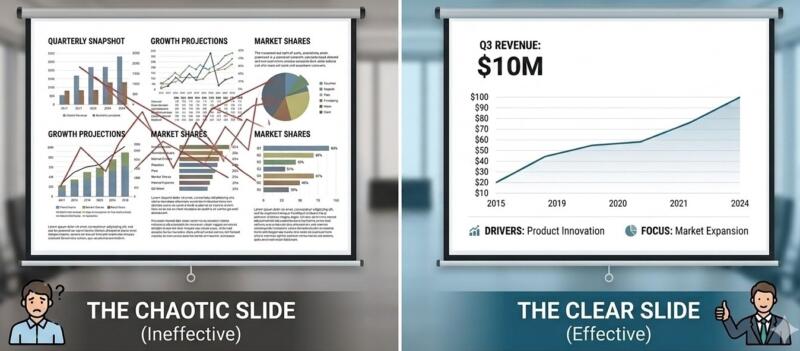
It is the ultimate presentation nightmare: you look out at the conference table, and instead of engaged, nodding heads, you are met with the glowing laptops and people buried in their smartphones. When a slideshow fails to land, the culprit is rarely the quality of your underlying metrics — it is a failure of structural clarity and vocal engagement. If you want to learn how to present data effectively, you have to stop treating your slides as a literal teleprompter and learn to master your presentation skills from the ground up. By ruthlessly stripping away visual clutter and changing how you physically interact with the room, you can transform a boring slide deck into a dynamic visual support system that commands total authority.
Structuring Content with Precision
Gemini Generated Image
To keep an audience from tuning out, a presenter must apply strict constraints to their visual real estate. Think of your slide as a finite equation where overloading the variables causes the entire system to crash. Bill recommends utilizing two excellent rule frameworks to force your data into crisp, readable boundaries:
The Constraints of Data Layout
The 1-6-6 Rule: Dedicate every single slide to one singular main idea. Limit the slide to a maximum of six bullet points, and restrict each bullet point to just six words.
The 5-5-5 Rule: If you prefer a different pacing, limit yourself to five lines of text per slide, with a maximum of five words per line. Crucially, never allow yourself to use more than five text-heavy slides in a consecutive row.
Draft in Word First: Before you ever open PowerPoint, outline your entire presentation framework in a basic document processor. This forces you to ruthlessly cut filler text and focus purely on your core narrative structure. Any dense, highly detailed data sets or spreadsheets belong in an appendix or your private slide notes—not on the main screen.
Clean Data Design
Consistent Formatting: Maintain a cohesive theme by sticking to a maximum of one or two highly readable, standard fonts (such as Calibri or Arial) across your entire deck.
High Contrast Visuals: Ensure your text jumps out cleanly against a solid background color. Avoid busy or distracting background images behind text blocks that force the human eye to strain to read your metrics.
Visual Alignment: Replace dense paragraphs with elegant graphs, charts, and diagrams. When arranging multiple data visual elements on a single canvas, always utilize the Align and Distribute software tools to keep your layout perfectly proportioned and visually balanced.
Mastering Delivery and Engagement
Gemini Generated Image
A perfect slide design is only half the battle; the magic happens in how you deliver it. Your audience can read text significantly faster than you can speak it aloud. The moment you display a massive paragraph, you have effectively lost the room because they are reading ahead instead of listening to your voice.
Executive Delivery Tactics
Stop Reading Your Slides: Your deck is not a script. Speak directly to your audience, maintain active eye contact, explain the deeper meaning behind the graphics, and use the slides strictly to complement your spoken words.
Reveal Points Gradually: Prevent your audience from reading ahead by using clean animations like “Appear” or “Float In.” Bring up your bullet points one at a time, keeping the visual rhythm completely synchronized with your vocal pacing.
Leverage Presenter View: Never look back at the big screen to see what is behind you. Utilize PowerPoint’s Presenter View on your laptop to secretly monitor your upcoming slides, keep track of a presentation timer, and read your personal talking notes while your audience stays focused entirely on the main display screen.
Advanced Polish Techniques
The Slide Master: Do not waste valuable presentation prep time updating individual slides one by one. Use the Slide Master view to execute universal formatting changes—like adding a company logo, adjusting a default font size, or altering a background theme—instantly across your entire deck.
The Morph Transition: Create high-end, seamless visual continuity by utilizing the Morph transition. By simply duplicating a slide and slightly moving an image, diagram, or 3D model to a new position, PowerPoint automatically generates a smooth, professional animation that glides effortlessly into the next point.
Your Next Presentation Checklist:
Image by Geralt Button via Pixabay
[ ] Outline raw text in Word before touching a design layout.
[ ] Apply the 1-6-6 or 5-5-5 rules to force visual whitespace.
[ ] Set up Presenter View so your eyes never leave your audience.
[ ] Set up staggered animations so you control the room’s reading pace.
Ready to Command the Room?
If you are tired of watching your hard work get ignored by a room full of people scrolling through their phones, it is time to upgrade your executive presence. Designing a beautiful deck is a science; delivering it with absolute vocal authority is an art.
We offer specialized classes designed to fix both sides of the coin:
The Vocal Authority Masterclass: Work directly with a professional voice and speech coach to master your pacing, eliminate slide-reading habits, and use your voice to keep an audience hanging on your every word.
The Presentation Design Lab: Learn how to apply logical, clean design constraints to your data so your slides look sharp, professional, and instantly understandable.






 If you are tired of watching your hard work get ignored by a room full of people scrolling through their phones, it is time to upgrade your executive presence. Designing a beautiful deck is a science; delivering it with absolute vocal authority is an art.